
Thursday, March 27, 2008
Protect Your Privacy When Downloading
Lifehacker: "Whether you're downloading copyrighted material or not, no one likes to have their activities online monitored. Let's take a look at ways you can protect your downloading and file sharing privacy, and prevent the big media companies and other anti-P2P organizations from spying on your file sharing habits."

Wednesday, March 26, 2008
Microstock
I was always curious if I could make any money with my photographs. So far it was nice hobby but would not be nice if I can finance my next upgrade from selling photos? It has to by part-time work since I am not going to quit my current profession soon ;-) I tried microstock site while ago and I was frustrated with rejections. Couple days ago I found a place on internet where I could get knowledge from others. It is called Microstock Group, a meeting place for microstock photographers. I read posts on forums and it seems to be normal that beginner are having more rejections until they learn what this website want. More over, different microstock website want different photos and has more or less strict approval rules. The I found Microstock How To with lots of interesting info about most popular websites.
I decided to give it another try and enrolled to sites which are so called "Big 7":
Shutterstock
IstockPhoto
Dreamstime
Fotolia
Stockxpert
BigStockPhoto
123rf
Since I am newbie I decide that I will try to upload 500 random pictures from my collection to see how it would work for me. I did not make any particular selection, I chose randomly. Different sizes, subjects, quality.
Shutterstock. The number one site for microstock. It is truly efficient. Uploading thru FTP took 8 hours. The you can submit pictures in 50 piece batches. User interface is ok but I wish it remembers tags I used before and somehow let me to reuse them. They are quite strict, my rejection rate is about 90% but in couple cases I thought photo is bad and not interesting but they approved it. I am in the middle of submitting process so I can give exact number when I am done. They are quick, most photos were reviewed on same day.

Istockphoto. I am a little disappointed with them. After whole day it's still not up and ready. I had to upload my photo id twice and approval is still pending.
Dreamstime. I can upload only 100 files. FTP upload is available but I blocked my bandwith trying to finish upload to other sites :-)

Fotolia. This are the guys. I tried while ago. It took almost whole day to upload 500 files. Submitting interface is a little better. It remembers categories but still do not remembers tags. There 10 photos displayed per page so it would slow me a little even if it seems to be easier to fill data per each photo. After one day they did not touch any of my pending photos.

Stockxpert. They wanted 10 photos for approval first and do not give any status for this process.
BigStockPhoto. FTP works but I am limited to 250 pictures. In addition to that they only review 20 photos at the time so I am done here for a while. I hate that they not only require 7 tags like others but also at least seven words description. Category selection also sucks.

123rf. FTP upload seems to be quite fast but then if I want to display pending queue it is not paged and tries to download huge web page :-) They also want photo ID for verification.

I decided to give it another try and enrolled to sites which are so called "Big 7":
Since I am newbie I decide that I will try to upload 500 random pictures from my collection to see how it would work for me. I did not make any particular selection, I chose randomly. Different sizes, subjects, quality.
Shutterstock. The number one site for microstock. It is truly efficient. Uploading thru FTP took 8 hours. The you can submit pictures in 50 piece batches. User interface is ok but I wish it remembers tags I used before and somehow let me to reuse them. They are quite strict, my rejection rate is about 90% but in couple cases I thought photo is bad and not interesting but they approved it. I am in the middle of submitting process so I can give exact number when I am done. They are quick, most photos were reviewed on same day.
Istockphoto. I am a little disappointed with them. After whole day it's still not up and ready. I had to upload my photo id twice and approval is still pending.
Dreamstime. I can upload only 100 files. FTP upload is available but I blocked my bandwith trying to finish upload to other sites :-)
Fotolia. This are the guys. I tried while ago. It took almost whole day to upload 500 files. Submitting interface is a little better. It remembers categories but still do not remembers tags. There 10 photos displayed per page so it would slow me a little even if it seems to be easier to fill data per each photo. After one day they did not touch any of my pending photos.
Stockxpert. They wanted 10 photos for approval first and do not give any status for this process.
BigStockPhoto. FTP works but I am limited to 250 pictures. In addition to that they only review 20 photos at the time so I am done here for a while. I hate that they not only require 7 tags like others but also at least seven words description. Category selection also sucks.
123rf. FTP upload seems to be quite fast but then if I want to display pending queue it is not paged and tries to download huge web page :-) They also want photo ID for verification.
Tuesday, March 25, 2008
Lightroom 300 Presets
Inside Lightroom - site is a resource for tips, tricks and also hosts Lightroom Develop Presets. Download.

Other cool presets: L7Foto
Other cool presets: L7Foto
Monday, March 24, 2008
Bug in Lightroom 1.4: Exif Datetime is corrupted in exported files
It seems that 1.4 has a bug: the “time taken” is set to midnight in copies of the file that are exported. The Lightroom database and the original files maintain the correct time, but when you export a copy, the time is reset to midnight. It necessary to downgrade to an earlier version of Lightroom.

The Lightroom 1.4 update has been temporarily removed from the Adobe.com web site in order to allow time for additional investigation into several bugs that were discovered after the update was released. At this time, we recommend uninstalling Lightroom 1.4 and installing Lightroom 1.3.1.
The Lightroom 1.4 update has been temporarily removed from the Adobe.com web site in order to allow time for additional investigation into several bugs that were discovered after the update was released. At this time, we recommend uninstalling Lightroom 1.4 and installing Lightroom 1.3.1.
Friday, March 21, 2008
Babka piaskowa z makiem / Bundt cake with poppy seeds
Ingredients
* 1 glass of wheat flour
* 1 glass potato flour
* 1 glass of sugar
* 250g of butter
* 4 eggs
* 1 glass of poppy seeds
* 1 1/3 glass of milk
* 6 dried figs
* 2 teaspoons of baking powder
* 2 teaspoons of almond extract
Instructions
Mix wheat flour with baking powder. Pound butter, adding gradually eggs, sugar and both types of flour. Add milk and sifted poppy seeds. Pound all ingredients one more time, add chopped figs sprinkled in flour and mix. Paste into bundt pan oiled with butter and powdered with bread crumbs. Bake in oven heated to 350F for 50 min

* 1 glass of wheat flour
* 1 glass potato flour
* 1 glass of sugar
* 250g of butter
* 4 eggs
* 1 glass of poppy seeds
* 1 1/3 glass of milk
* 6 dried figs
* 2 teaspoons of baking powder
* 2 teaspoons of almond extract
Instructions
Mix wheat flour with baking powder. Pound butter, adding gradually eggs, sugar and both types of flour. Add milk and sifted poppy seeds. Pound all ingredients one more time, add chopped figs sprinkled in flour and mix. Paste into bundt pan oiled with butter and powdered with bread crumbs. Bake in oven heated to 350F for 50 min
Mazurek
3 yolks
200g of powdered sugar
120g of butter (add in portions)
120g of flour
250g of ground walnuts
Wafer (for a bottom of pan)
3 egg whites
80g of sugar (froth with egg whites)
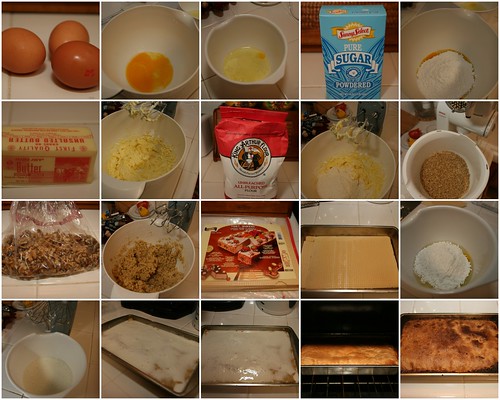
200g of powdered sugar
120g of butter (add in portions)
120g of flour
250g of ground walnuts
Wafer (for a bottom of pan)
3 egg whites
80g of sugar (froth with egg whites)
Thursday, March 20, 2008
Sigma 50mm f/1.4
The Sigma Corporation is pleased to announce the new large aperture 50mm F1.4 EX DG HSM standard lens. For Sigma, Canon, Nikon, Pentax and Sony.
Characteristics
Standard lens with large maximum aperture of F1.4.
It creates sharp images with high contrast and ensures superior peripheral brightness.
Incorporates molded glass aspherical lens, perfectly correcting coma aberration and creating superior image quality.
Super multi-layer coating reduces flare and ghosting.
Hyper Sonic Motor (HSM) ensuring silent, high-speed AF

Characteristics
Subscribe to:
Posts (Atom)