Thursday, November 17, 2011

Kindle Fire Newsstand

I haven't had paper magazine subscription for couple years but now I got this new media consuming device so I wanted to try how it works in digital era. I subscribed to two trials of cooking magazines cause it seems like most practical things I might use.

[caption id="" align="aligncenter" width="470" caption="Kindle Fire Newsstand"]Kindle Fire Newsstand[/caption]

Selection was quite limited so my favorite Cuisine At Home was not available. I chose  Bon Apetit and Everyday Food. First impression is that they look quite like real versions. But there is a catch, all this pretty photos take a lot of space and on digital reader space is limited so I hope that there is a way to store everything in Amazon Cloud otherwise if I got couple subscriptions I will run out of space pretty soon. Second, I do like that half of the pages are ads. Did not I paid for subscription? Why I have to still download all this commercial payload? In traditional newspaper model for years people tolerated this double dipping model cause it did not cost them money. When you got newspaper which 20% is actual content you most likely discard unwanted ad pages. You cannot do that with digital file. First it is in one piece, second, it is DRM protected. In result you got crippled product and you have to pay for storage or bandwith. I think publishers need to change their distribution model if they want to be success in digital age. Right now they just repackage their current junk and hope people will buy it as they used to.

[ad#adsense-1]

My short wishlist for Kindle Fire

I have played with Kindle Fire for two evenings my experience is quite positive. It does a lot of things right but there is a small number of things I wish to be there but I could not find a solution for it so far.

[caption id="" align="aligncenter" width="470" caption="Kindle Fire"]Kindle Fire[/caption]

  1. Some way to group/organize apps. Maybe folders or pages but if typical user downloads a lot of stuff in a first week it is pretty messy. Maybe it is there but I haven't read manual :-)

  2. Cloud printing solution. I wish it could be easy to print from this device. Some apps claim support of Google Cloud Print but reviews do not confirm that. I need to do more research on that.

  3. Screen shots, the best thing would be system wide gesture similar to Print Screen command on Windows. Right now I am not going to root my brand new device in order to check some screen capturing apps.

  4. Screen mirroring to allow stream my Prime videos on big TV in my living room. Something similar to AirPlay. Tried iMediaShare app andit islimited to it's own channels. AppleTV support is in Beta and for me only worked with Picasa photos. I was not able to stream movies. On the other hand DLNA support seems to be be pretty good. Worked with my Samsung TV without any problems. I am still waiting for doubleTwist + AirSync update. Right now it is not compatible with Kindle Fire and it is hard to tell if it can mirror screen.


[ad#adsense-1]

Wednesday, November 16, 2011

Kindle Fire Initial Thoughts

Yesterday I received my pre-ordered Kindle Fire. First I must state that I have no prior experience with tablets or iOS so I am not going to compare my experience with Kindle Fire to anything else.

[caption id="" align="aligncenter" width="470" caption="Kindle Fire"]Kindle Fire[/caption]

Packaging.
I was surprised with minimalistic packaging. When you open box that Amazon ships you will find only slate wrapped in plastic and small card. The card describes how to turn device on and how to unlock the screen. That's it. No user manuals, warranty cards, special offers. You also get small micro USB power supply but I bet you can charge Kindle from any USB port on your computer if you already got this type of cable.

Initial setup.
First step shown after pressing power button (I am not sure, but most likely device was only in sleep mode) is Wi-Fi setup. It worked without problems with my router. So far I haven't seen any connection drops. I got NetgearWNR2200 in 300Mbps mode and AppleTV2 is constantly dropping connections so I was skeptical but KF seems to handle it better. Second step was downloading of OS update and it took a while but no problems to report. At the end I asked about my identity. It looks like it was preloaded with my data so I did not have to enter anything about my Amazon account. It just registered my device.

User experience.
Finally it shows main screen which looks like bookshelf. Kindle Fire does not have any buttons so most of apps got think belt at the bottom of the screen to activate toolbar. It is not a big deal when you get used to it but some applications not written for Kindle Fire might have part of their screen covered by it. Device comes preloaded with all Amazon Android apps and without any Google apps. If you stay in Amazon ecosystem it might be sufficient. So far I cannot tell when I need to get something from outside. One of the applications I was counting to get was doubleTwist which is not supported yet.

Cloud.
When you looks at your shelf you might noticed that some stuff is on your device but a lot of media is offloaded to Amazon Cloud. I am ok with it. I already uploaded my music to their cloud so I can stream it instantly on this device. All my Kindle books also appeared automatically but when I tried to open Kindle downloaded a book from net. When you buy app from you desktop computer browser it will end up in a cloud too. You have to install it to the device later.

1-Click everywhere.
If you are Amazon Prime user and got it turned on you will noticed that it's extremely easy to shop with this device. It never asks you any questions so I am a little concerned if I can give it to my daughter. She might buy something without even knowing it.

Conclusion.
I read reviews comparing this device to other tablets claiming slow performance and limited experience. Yes it is not iPad2 or any high-end Android tablet but if you are only interested in consuming media and you are Amazon customer it could be sufficient. I haven't tested any games that require a lot of GPU power but for casual gamer mostly playing flash games on internet it was fast enough. There are many things I haven't touched so far so later I might have different opinion. Right now I think that for average consumer it will be sufficient.

Thursday, August 4, 2011

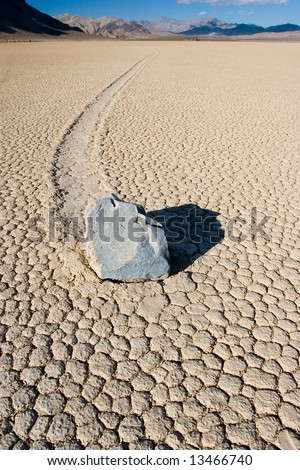
Extended license on Shutterstock - Racetrack Playa

One of my favorite photos, I have been there only two times so far and this photo comes from my first trip. It is two hours drive one way from Ubehebe Crater on a pretty rough road which does not require 4x4 but if you do not have it you would be extremely slow. If you reach it you will see sailing stones a geological phenomenon where rocks move in long tracks along a smooth valley floor without human or animal intervention.

[caption id="" align="aligncenter" width="301" caption="Racetrack Playa"]Racetrack Playa[/caption]

Racetrack Playa is a seasonally dry lake (a playa) located in the northern part of the Panamint Mountains in Death Valley National Park, California.

[ad#adsense-1]

Wednesday, August 3, 2011

July 2011 Earnings Breakdown

After almost record last month I did not expect much from current result. Still it was 4th best month overall and 3rd best on SS. DT bounced back from the bottom, it was best month for them this year. 123RF was on the other hand having 2nd worst month of this year. FT was also down and IS almost repeated result from last four months. SXP continues to disappoint and it was beaten by CSP. Veer and BS added few sales this month.


Jully 2011JulyJuly/JuneRPD
SS

61.40%


96.50%


0.65


DT

12.11%


180.15%


0.69


123RF

9.64%


40.60%


0.59


FT

4.81%


67.92%


0.43


IS

4.77%


94.47%


1.03


CSP

3.14%


0.95


SXP

2.08%


89.29%


0.25


Veer

0.93%


0.93


BS

0.63%


95.00%


0.63


YM

0.33%


1.00


FP

0.17%


0.50


90.95%


0.63


[caption id="attachment_880" align="aligncenter" width="300" caption="2011 July Microstock"]2011 July Microstock[/caption]

[ad#adsense-1]

Friday, July 22, 2011

Extended license on Shutterstock - Big Sur HDR

This time I sold extended license of the image I made in Big Sur. I am not doing it as often I I could cause I simply forget shoot with exposure bracketing. Image has been processed in Photomatix.

[caption id="" align="aligncenter" width="450" caption="Big Sur"]Big Sur[/caption]

Big Sur is a sparsely populated region of the central California coast where the Santa Lucia Mountains rise abruptly from the Pacific Ocean.

[ad#adsense-1]

Monday, July 11, 2011

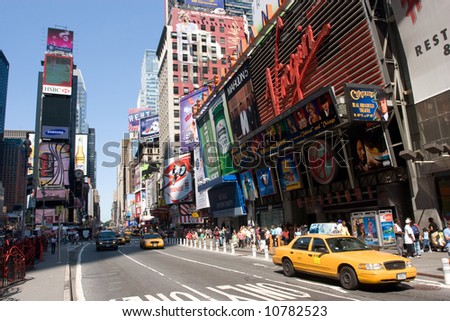
Extended license on Shutterstock - NYC

This is probably going to be my best selling image after another extended license sold today.

[caption id="" align="aligncenter" width="450" caption="NYC"]NYC[/caption]

I have noticed that this image was used on Amazon.com for Sylvania SYTAB10MT 10-Inch Magni Tablet

[caption id="" align="aligncenter" width="450" caption="Sylvania SYTAB10MT 10-Inch Magni Tablet"]Sylvania SYTAB10MT 10-Inch Magni Tablet[/caption]

[ad#adsense-1]